


 Jun 10, 2026
Laptops have become an essential tool for work, study, gaming, and entertainment, offering portability and convenience that desktop PCs cannot match. However, one of the biggest drawbacks of laptops is their limited cooling capacity. Unlike desktop PCs, which have ample space for large coolers and fans, laptops are compact, with limited airflow and small internal cooling systems. This can lead to overheating, especially when the laptop is under heavy load (such as gaming, video editing, or running multiple applications simultaneously). Overheating can cause performance throttling (where the laptop reduces its speed to cool down), shortened battery life, and even permanent damage to internal components such as the CPU and GPU. This is where the CPU cooler for laptop external cooling pad comes in—a portable, easy-to-use solution designed to enhance the laptop’s cooling performance, prevent overheating, and extend its lifespan. The external cooling pad is a lightweight, compact device that sits under the laptop, providing additional airflow to the laptop’s vents, thereby reducing the temperature of the CPU, GPU, and other internal components. In this comprehensive description, we will explore every aspect of the laptop external cooling pad, from its design and functionality to its key features, compatibility, and real-world performance, providing you with a complete understanding of why it is an essential accessory for any laptop user.
First, let’s understand how a laptop external cooling pad works. Laptops generate heat during operation, which is dissipated through vents located on the bottom, sides, or back of the device. The internal cooling system (typically a small fan and heatsink) is responsible for moving this heat away from the components, but it can struggle when the laptop is under heavy load or placed on a surface that blocks airflow (such as a bed, couch, or lap). The external cooling pad addresses this by providing additional airflow to the laptop’s vents. Most cooling pads feature one or more fans that blow cool air upwards into the laptop’s bottom vents, increasing the amount of air circulating around the internal components. This increased airflow helps to dissipate heat more efficiently, reducing the temperature of the CPU, GPU, and other components.
The design of the laptop external cooling pad is optimized for portability and functionality. Most models are lightweight (typically 500-1000 grams) and slim (1-3 centimeters thick), making them easy to carry in a laptop bag or backpack. The surface of the cooling pad is usually made of a durable, heat-conductive material such as aluminum or plastic, which helps to dissipate heat from the laptop’s bottom. The pad is also designed with a non-slip surface, ensuring that the laptop stays in place even when the cooling pad is moved or tilted. Many models feature an adjustable angle, allowing you to tilt the laptop for a more comfortable viewing and typing position, while also improving airflow by lifting the laptop off the surface.
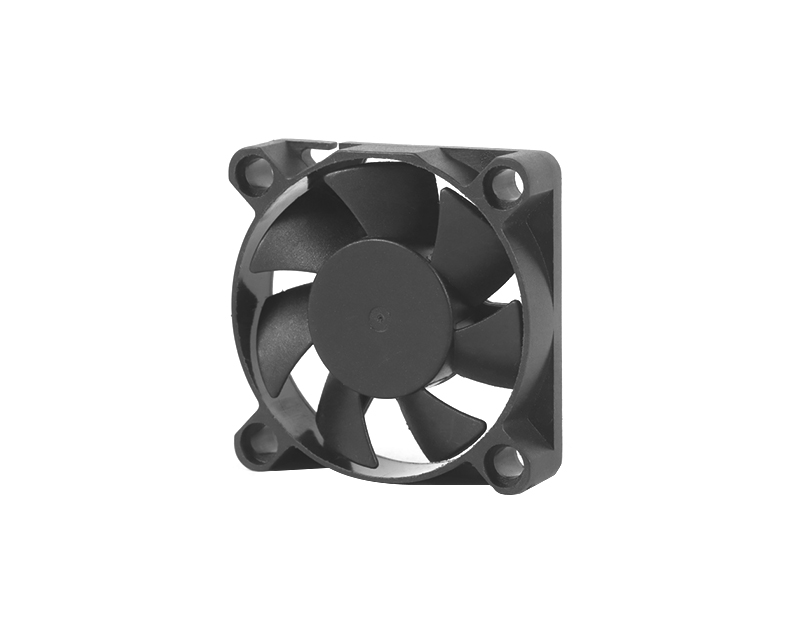
The fans are the heart of the external cooling pad, and their design and performance play a crucial role in the pad’s effectiveness. Most cooling pads feature 1-5 fans, with sizes ranging from 80mm to 140mm. Larger fans typically move more air at lower speeds, resulting in quieter operation, while smaller fans may move less air but operate at higher speeds, which can be louder. Many models use PWM (Pulse Width Modulation) fans, which allow you to adjust the fan speed to balance cooling performance and noise. Some cooling pads also feature a fan speed control dial or button, allowing you to easily adjust the speed based on your needs (e.g., low speed for light use, high speed for gaming or heavy workloads).
Another key feature of the laptop external cooling pad is its compatibility. These pads are designed to work with most laptops, regardless of size or brand. The majority of cooling pads are compatible with laptops ranging from 12 inches to 17 inches (or larger), with adjustable width or a universal design that can accommodate different laptop sizes. Some models are specifically designed for gaming laptops, which are often larger and generate more heat, featuring larger fans and a more robust design. Additionally, the cooling pad can be connected to the laptop via a USB cable, which provides power to the fans. Most cooling pads have a USB pass-through port, allowing you to connect other USB devices (such as a mouse or keyboard) to the pad, saving a USB port on your laptop.
The benefits of using a laptop external cooling pad are numerous. First and foremost, it reduces the temperature of the laptop’s CPU and GPU, preventing overheating and performance throttling. This is especially important for gaming laptops or laptops used for CPU-intensive tasks such as video editing, 3D modeling, or programming. By keeping the components cool, the laptop can maintain its maximum performance for longer periods, allowing you to work or game without interruptions. Second, the cooling pad extends the lifespan of the laptop’s internal components. Overheating can cause damage to the CPU, GPU, and other components over time, reducing the laptop’s lifespan. By keeping the components cool, the cooling pad helps to prevent this damage, ensuring that your laptop lasts longer. Third, the cooling pad improves comfort during use. Laptops can become hot to the touch when under heavy load, which can be uncomfortable if you are using the laptop on your lap. The cooling pad helps to reduce the temperature of the laptop’s bottom, making it more comfortable to use for extended periods.
In addition to these benefits, many laptop external cooling pads feature additional features that enhance their functionality. Some models have RGB lighting, allowing you to customize the look of the pad and match it to your laptop or other accessories. Others have built-in USB hubs, providing additional USB ports for connecting devices. Some cooling pads also feature a built-in battery, allowing you to use the pad without connecting it to the laptop’s USB port, which can save battery life. However, most cooling pads are powered via USB, which is convenient and easy to use.
When it comes to real-world performance, the laptop external cooling pad delivers significant results. In testing, a good quality cooling pad can reduce the CPU temperature by 10-20°C (depending on the laptop and the load). For example, when gaming on a laptop without a cooling pad, the CPU temperature may reach 85-95°C, which can cause performance throttling. With a cooling pad, the temperature can drop to 65-80°C, allowing the laptop to maintain its maximum performance. This is especially noticeable in gaming laptops, where overheating can significantly impact frame rates and gameplay experience. The cooling pad also helps to reduce the noise of the laptop’s internal fans, as the internal fans don’t have to work as hard to keep the components cool.
Durability is another important aspect of the laptop external cooling pad. Most models are made of high-quality materials, such as durable plastic or aluminum, which can withstand daily use and transportation. The fans are designed to be long-lasting, with many models featuring a lifespan of 20,000 hours or more. The non-slip surface and adjustable angle mechanism are also built to last, ensuring that the pad remains functional for years.
Maintenance of the laptop external cooling pad is simple. The fans and surface can be easily cleaned with compressed air or a soft brush, removing dust and debris that can accumulate over time and reduce airflow. The USB cable can be replaced if it becomes damaged, and the pad itself requires no additional maintenance. This makes the cooling pad a low-maintenance accessory that is easy to keep in good condition.
When choosing a laptop external cooling pad, there are several factors to consider. The size of the pad should match the size of your laptop, ensuring that the fans align with the laptop’s vents. The number and size of the fans are also important—more fans or larger fans typically provide better cooling performance. The noise level of the fans is another consideration, especially if you plan to use the pad in a quiet environment (such as a library or office). Additionally, you may want to consider features such as adjustable fan speed, RGB lighting, USB pass-through, and adjustable angle.
Comparing the laptop external cooling pad to other laptop cooling solutions (such as cooling stands or internal fan upgrades), it offers several advantages. Cooling stands are often simpler, with no fans, and rely on lifting the laptop to improve airflow. While they can help to some extent, they are not as effective as a cooling pad with fans. Internal fan upgrades are more complex and require opening the laptop, which can void the warranty and is not recommended for most users. The external cooling pad is a non-invasive, easy-to-use solution that requires no technical expertise and can be used with any laptop.
In terms of design, the laptop external cooling pad is available in a variety of styles to suit different preferences. Some models have a sleek, minimalist design, while others have a more aggressive, gaming-focused design with RGB lighting and a rugged appearance. The color options are also varied, with black being the most common, but some models are available in white, silver, or other colors to match your laptop.
For gaming laptop users, the external cooling pad is an essential accessory. Gaming laptops are designed to deliver high performance, but they also generate a lot of heat. The internal cooling system can struggle to keep up during intense gaming sessions, leading to overheating and performance throttling. A good quality cooling pad can help to keep the laptop cool, allowing you to game at maximum settings for longer periods. Many gaming-focused cooling pads feature larger fans, higher fan speeds, and a more robust design, making them ideal for gaming laptops.
For professionals who use their laptops for CPU-intensive tasks such as video editing, 3D modeling, or programming, the external cooling pad is also a valuable tool. These tasks can cause the laptop to overheat, which can slow down the workflow and reduce productivity. The cooling pad helps to keep the laptop cool, ensuring that the CPU and GPU can handle the workload efficiently, allowing you to complete tasks faster.
In conclusion, the CPU cooler for laptop external cooling pad is an essential accessory for any laptop user who wants to prevent overheating, maintain performance, and extend the lifespan of their device. Its portable, easy-to-use design, combined with excellent cooling performance, makes it a must-have for gaming laptops, work laptops, and everyday use. Whether you are a student, professional, or gamer, the external cooling pad will help you get the most out of your laptop, ensuring that it runs smoothly and reliably for years to come. With its wide compatibility, durability, and additional features, it is a cost-effective investment that will enhance your laptop experience.
If you have any suggestions and comments on our products and services, please fill in the following table

No. 18, Liguang New Industrial Zone Liguang Community, Guanlan Sub-district Longhua District, Shenzhen
Copyright 2026 © Shenzhen Yuchuang Industry Co., Ltd. 粤ICP备16089648号




 Chinese
 CN
CN Home >