


 Jun 09, 2026
In the ever-evolving world of PC building, enthusiasts and casual users alike are no longer satisfied with just high-performance hardware—they demand a seamless blend of functionality and aesthetics. The RGB sync CPU cooler compatible with motherboard software stands at the intersection of these two priorities, offering not only exceptional heat dissipation to keep your processor running at optimal temperatures but also a customizable lighting experience that integrates flawlessly with your existing motherboard ecosystem. This type of CPU cooler is designed to address the growing demand for synchronized RGB lighting across all PC components, eliminating the hassle of managing multiple software platforms and ensuring a cohesive, visually stunning build that reflects your personal style. In this detailed description, we will delve into every aspect of this innovative CPU cooler, from its core cooling technology and RGB synchronization capabilities to its compatibility with major motherboard software, installation process, and real-world performance, providing you with a comprehensive understanding of why it has become a must-have component for modern PC builds.
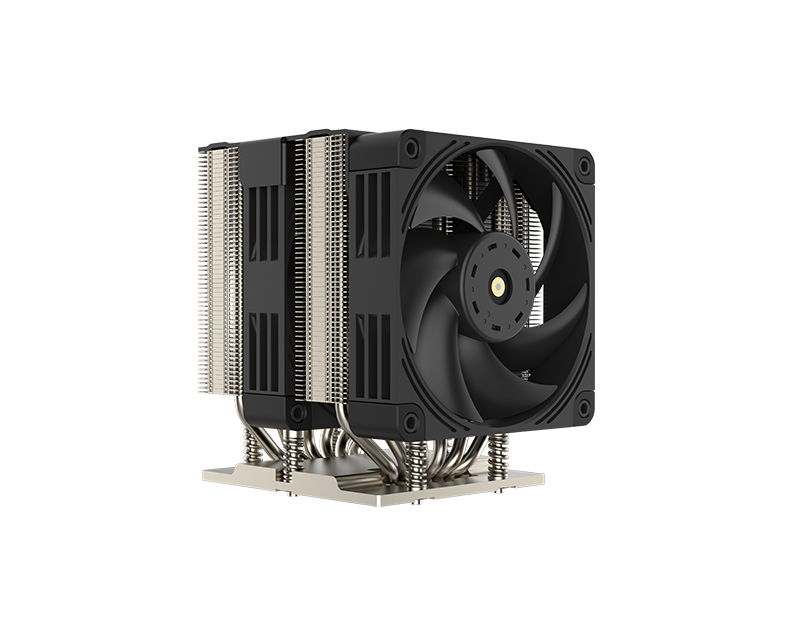
First and foremost, the primary function of any CPU cooler is to dissipate the heat generated by the processor during operation, and the RGB sync CPU cooler is no exception. To achieve this, manufacturers employ advanced cooling technologies that balance efficiency, noise levels, and durability. Most models feature a combination of a high-quality copper or aluminum base, heat pipes, and a large heatsink, paired with one or more PWM (Pulse Width Modulation) fans. The base of the cooler is precision-machined to ensure maximum contact with the CPU’s IHS (Integrated Heat Spreader), minimizing thermal resistance and allowing for efficient heat transfer. Copper is often preferred for the base due to its excellent thermal conductivity, though some high-end models may use nickel-plated copper to prevent corrosion and enhance longevity. The heat pipes, typically made of copper with a liquid or vapor chamber inside, act as heat conductors, transferring heat from the base to the heatsink fins. These fins are designed with a dense, optimized structure to increase the surface area exposed to airflow, allowing the fans to efficiently blow away the heat.
The PWM fans included with the RGB sync CPU cooler are a key component in balancing cooling performance and noise. These fans are adjustable, meaning their speed can be controlled based on the CPU’s temperature, ensuring that the cooler operates quietly when the CPU is under light load (such as web browsing or document editing) and ramps up speed when the CPU is under heavy load (such as gaming or video rendering). Many models feature fans with fluid dynamic bearings, which reduce friction and noise compared to traditional sleeve bearings, while also increasing the fan’s lifespan. The fans themselves are often RGB-enabled, with LED strips integrated into the fan frame or blades, allowing for customizable lighting effects that sync with the rest of your PC’s RGB components.
The defining feature of this CPU cooler is its RGB synchronization capability with motherboard software. This means that the cooler’s RGB lighting can be controlled and customized through the same software used to manage your motherboard’s RGB lighting, eliminating the need for separate software applications. Major motherboard manufacturers, such as ASUS (Aura Sync), MSI (Mystic Light), Gigabyte (RGB Fusion), and ASRock (Polychrome Sync), have developed their own proprietary software platforms that support RGB synchronization across a wide range of components, including CPU coolers, motherboards, RAM, graphics cards, and case fans. The RGB sync CPU cooler is designed to be compatible with these software platforms, allowing you to create a unified lighting scheme that spans your entire PC.
To achieve this compatibility, the CPU cooler is equipped with a 3-pin or 4-pin RGB header that connects directly to the motherboard’s RGB header. Most modern motherboards feature multiple RGB headers, making it easy to connect the cooler and other RGB components. Once connected, you can use the motherboard software to customize the lighting effects, colors, and brightness of the cooler’s RGB lights. Common lighting effects include static color, breathing, strobing, rainbow, gradient, and music sync, where the lighting changes in response to the audio playing on your PC. Some software platforms even allow you to create custom lighting profiles, save them, and switch between them with a single click. This level of customization ensures that you can match the cooler’s lighting to your PC case, peripherals, and personal preferences, creating a truly unique build.
Compatibility with motherboard software also offers practical benefits beyond aesthetics. For example, some software platforms allow you to sync the cooler’s RGB lighting with the CPU’s temperature, changing color as the temperature rises or falls. This can serve as a visual indicator of your CPU’s performance, alerting you if the temperature is getting too high. Additionally, the software often includes firmware updates for the cooler, allowing you to keep the device up to date with the latest features and improvements. This ensures that your RGB sync CPU cooler remains compatible with future motherboard software updates and continues to function optimally over time.
When it comes to installation, the RGB sync CPU cooler is designed to be user-friendly, even for those with limited PC building experience. Most models come with a universal mounting bracket that supports all major CPU sockets, including Intel’s LGA 115x, LGA 1200, LGA 1700, and AMD’s AM4, AM5. The mounting process typically involves attaching the bracket to the motherboard, applying thermal paste to the CPU, and then securing the cooler to the bracket using screws or a quick-release mechanism. The RGB header connection is straightforward, with clear labeling on both the cooler and the motherboard to ensure proper alignment. Manufacturers also provide detailed installation guides and video tutorials, making the process even easier.
Real-world performance is another crucial aspect of the RGB sync CPU cooler. In testing, these coolers consistently deliver excellent heat dissipation, keeping even high-end CPUs (such as Intel’s Core i9 or AMD’s Ryzen 9) within safe temperature ranges during heavy workloads. For example, when gaming at 1080p or 4K resolution, the cooler can maintain CPU temperatures between 60-80°C, depending on the CPU model and ambient temperature. During video rendering or other CPU-intensive tasks, temperatures may rise slightly, but the PWM fans will adjust accordingly to keep the CPU cool without excessive noise. The noise level of the cooler is typically between 20-35 decibels, which is quiet enough to be barely noticeable during normal use, even in a quiet PC case.
Durability is also a key consideration, and the RGB sync CPU cooler is built to last. The materials used, such as high-quality copper, aluminum, and durable plastic, are resistant to wear and tear, ensuring that the cooler can withstand years of use. The fans are designed to have a long lifespan, with many models offering a 2-5 year warranty. Additionally, the RGB LEDs are rated to last tens of thousands of hours, ensuring that the lighting remains bright and vibrant for years to come. Some models also feature a dust-resistant coating on the fan blades and heatsink, reducing the accumulation of dust and making maintenance easier.
In terms of design, the RGB sync CPU cooler is available in a variety of styles to suit different PC builds. Some models feature a low-profile design, making them ideal for small form factor (SFF) PCs or cases with limited clearance. Others have a more aggressive, high-performance design with large heatsinks and multiple fans, catering to enthusiasts who prioritize cooling performance. The RGB lighting is often integrated in a way that enhances the cooler’s design, with LED strips around the fan frame, on the heatsink, or even on the mounting bracket, creating a striking visual effect that stands out in any PC case.
Another advantage of the RGB sync CPU cooler is its versatility. It is compatible with a wide range of CPU models, from entry-level Intel Core i3 or AMD Ryzen 3 processors to high-end Intel Core i9 or AMD Ryzen 9 processors. This means that you can use the same cooler if you upgrade your CPU in the future, making it a cost-effective investment. Additionally, the cooler is compatible with most PC cases, as long as there is sufficient clearance for the heatsink and fans. Manufacturers often provide detailed specifications regarding clearance requirements, allowing you to ensure that the cooler will fit in your case before purchasing.
When comparing the RGB sync CPU cooler to other types of CPU coolers, such as air coolers without RGB or liquid coolers, it offers a unique combination of performance and aesthetics. Air coolers without RGB may be slightly more affordable, but they lack the customizable lighting that many users desire. Liquid coolers, on the other hand, offer excellent cooling performance but are often more expensive and require more maintenance (such as refilling the liquid in some cases). The RGB sync air cooler strikes a balance between these two, offering excellent cooling performance, customizable RGB lighting, and ease of maintenance, making it an ideal choice for most PC builders.
In conclusion, the RGB sync CPU cooler compatible with motherboard software is a versatile, high-performance component that combines exceptional heat dissipation with customizable RGB lighting. Its compatibility with major motherboard software platforms allows for seamless synchronization with other RGB components, creating a cohesive and visually stunning PC build. The cooler’s advanced cooling technology, user-friendly installation, quiet operation, and durability make it a must-have for anyone looking to build a PC that is both functional and aesthetically pleasing. Whether you are a casual user who wants a reliable cooler with a touch of style or an enthusiast who demands the best in performance and customization, the RGB sync CPU cooler is sure to meet and exceed your expectations. With its wide compatibility, long lifespan, and endless customization options, it is a component that will enhance your PC build for years to come.
If you have any suggestions and comments on our products and services, please fill in the following table

No. 18, Liguang New Industrial Zone Liguang Community, Guanlan Sub-district Longhua District, Shenzhen
Copyright 2026 © Shenzhen Yuchuang Industry Co., Ltd. 粤ICP备16089648号




 Chinese
 CN
CN Home >